


In 2020, 9 out of 10 French companies would have suffered at least one major cyberattack. According to one Proofpoint study*. There is no longer any doubt that cybersecurity now concerns all organizations… and each of us: according to the respondents of the RSSI (Information System Security Officers), the behaviors of employees are at the heart of cyberattack risks.
True to our vocation of supporting the transformation of companies in an unstable digital environment, we are offering you a series of three articles rich in practical advice: Raising awareness among employees about good cybersecurity practices, with a first focus on the fight against fraud by email and the Phishing !
Stay tuned for our upcoming articles to learn how to secure your personal and professional data and how to properly manage access to your digital tools.

61% of French cybersecurity decision-makers believe that the human factor represents the main vulnerability of their company.
*Proofpoint cybersecurity study among 150 French DSI and RSSI from companies with more than 200 employees (10/2020)
Cybersecurity: messaging at the heart of the issues
Behind the intentional disclosure of data, Clicks on malicious links and the opening of email attachments Phishing They are prominent in the causes that could lead to a cyberattack According to the French RSSI. In other words, email is now a target of choice for hackers!
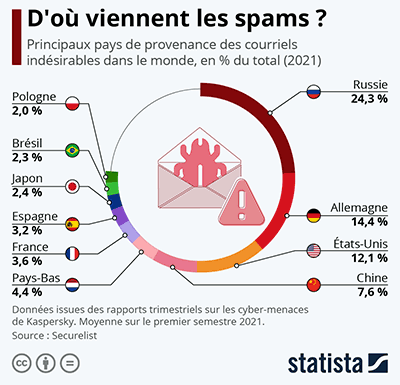
In this context, more and more companies are equipping themselves with Anti-spam solutions, whether it is online filtering services such as Mailinblack or Altospam, or more advanced software suites such as those published by Sophos or Trend Micro.
These solutions often go beyond simple anti-spam by integrating features such as: analysis technologies of messages and their attachments to protect against viruses, the Phishing and software of the type malware, spyware and ransomware.
On the part of webmail services such as Gmail, Yahoo Mail or Hotmail (now rebranded as outlook.com), the major players integrate automatic filtering – more or less advanced – of unwanted messages, while allowing you to intervene manually… which can quickly prove cumbersome if your email address, disclosed for example in the event of a data leak, ends up in the hands of too many spammers.
⚠️ In all cases, these messaging protection solutions do not promise to block 100% of email attacks… and do not completely prevent them. human error A moment of inattention over an apparently legitimate message is enough to transmit sensitive data in seconds and in an irreversible way here are our 3 tips to better identify fraudulent messages and risky links !
Tip #1: Be vigilant when receiving an email
When you receive a message, even before opening it, a simple glance at the information on the screen, such as the sender’s name or the subject of the email It can already alert you to the potentially dangerous nature of the content:
- If you don’t know the sender, it is at best unsolicited commercial communication (and prohibited in B2C under the GDPR)… feel free to mark the message as «spam» to allow anti-spam solutions to take your choice into account in the future.
- If the sender – a person or organization – is familiar to you (this data can be easily modified when sending an email), an inappropriate object or with unusual characters may alert you to the fraudulent nature of the message: depending on your email system, Hover over the sender’s name with your mouse (without clicking!) to preview the actual shipping email address (non-editable).

- In the case of someone you know, If the email address is different from the one you know, contact your contact person by another means to verify that they are indeed the sender of the message… and alert them of any possible identity theft.
- Finally, if your email client indicates (usually by a pictogram) that the email contains a attached document, This can be an additional indication, associated with the above checks, that the message is dangerous.
In any case, feel free to forward the suspicious message to your IT department (if necessary) so that they can take action before less vigilant employees make a mistake…
Tip #2: Knowing how to identify fraudulent content
If the steps above do not allow you to identify spam with certainty, the content of the email and any attached files can provide you with the necessary information to classify them as spam messages. Here are the elements that are almost systematically found in spam:
- The message is alarmist (for example, an unpaid bill with late fees)… or it offers you, on the contrary, a refund or an offer that is out of the ordinary
- The message does not contain any personal data other than your email address (in its entirety or «fragmented» to create the illusion of a personalized identifier)
- Immediate action is required and involves providing sensitive personal information (login credentials, banking details, etc.).
- Mistakes put amateur dictation enthusiasts to the test by Bernard Pivot
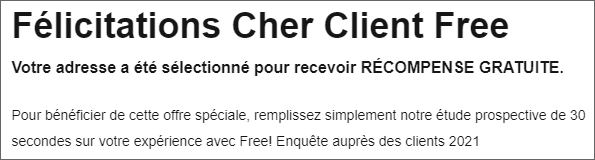
In order to collect your data, A spam email usually offers a link to a website. containing a form. A simple way to check the dangerous nature of the site, without clicking*, is to Hover over the link with your mouse: if the link does not start with «https», it means that the site is not secure. with a valid SSL certificate (no padlock in the address bar of your browser).
*If, by accident, you click on the link and arrive on a seemingly secure site, please check that the domain name displayed in your browser’s address bar matches the one you know or that is referenced in Google.
⚠️ When an attached file accompanies the message, exercise extra caution. before clicking on it, by checking its extension in particular: if the file ends with .exe, .bat, .vbs, .lnk, .pif… it is actually a software (malware, spyware, ransomware…) whose execution could quickly have serious consequences on your computer, or even on the entire company through your network connection.
Once these checks have been carried out, if the message appears fraudulent to you, mark it as spam and notify your IT department. You can also Report spam to the Signal Spam association which centralizes the reports in France for analysis and transmission to public authorities and private actors.
Tip #3: Learn to thwart attempts to Phishing
Following the previous advice can make it possible to identify with certainty the majority of spam. But the task is becoming increasingly difficult: It happens that the fraudulent message appears legitimate in all respects., This can go as far as taking over the discourse, the logo and the visual identity of a well-known organization… This is what we’re talking about here. Phishing or phishing.

However, faced with the (Machiavellian) ingenuity of hackers, it is essential that users become increasingly vigilant and learn to foil the cybercriminals’ traps: during the health crisis, in a context of strong growth in teleworking, Nearly two-thirds of the RSSI in France have observed an increase in attacks Phishing.
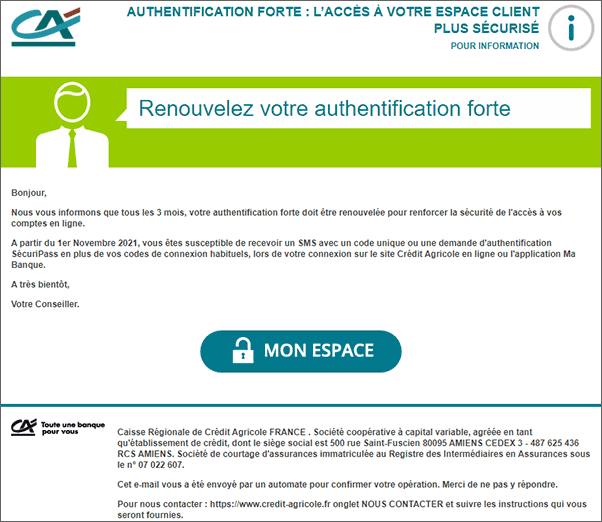
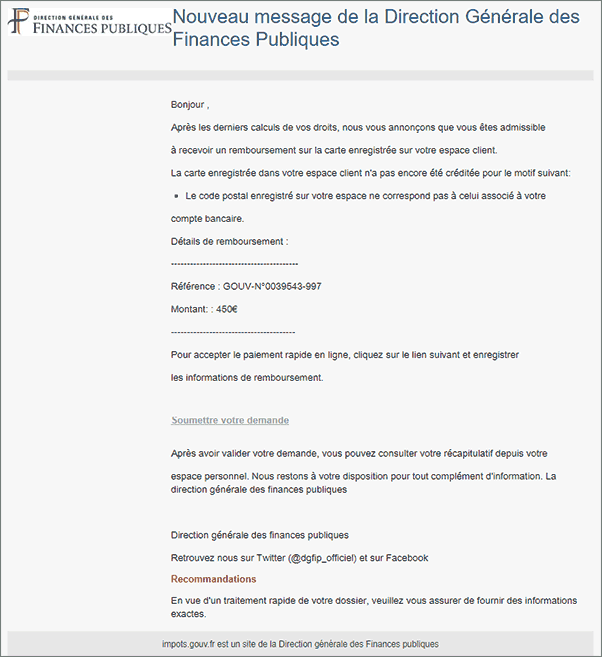
As part of the company, the fight against Phishing It is even more difficult when there is identity theft (Business Email Compromise, or BEC) with messages that appear to come from an important supplier, an IT technician, or even the CEO (we are then talking about «fraud against the President»), insisting on the urgency of an operation involving a bank transfer or sensitive data.
In the latter case, as in all those mentioned above, it is essential to taking the time to critically examine unusual requests involving the transmission of information. This step of reflection, combined with the checks mentioned above (consistency between the sender and the email address, credibility of the subject and content…) represents the key to effectively combating spam. Phishing.
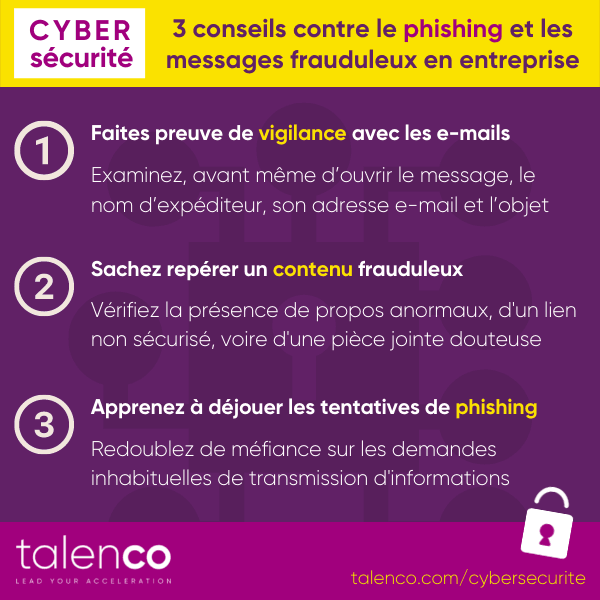
From simple spam to attempted Phishing, Email is at the heart of cybersecurity issues. To participate in the fight against cybercriminals, users must absolutely start by incorporating the above good practices in order to identify and reject fraudulent messages, which are a major cause of information leaks.
Stay tuned for our upcoming articles to learn how to secure your personal and professional data and how to properly manage access to your digital tools.